Sunday, June 7, 2015
Release 1.19 of Tioga
I've just released Tioga version 1.19. It fixes a couple of bugs, and finally brings the possibility to change the resolution of the target PDF file. A version of ctioga2 that needs this new feature should be published soon. Enjoy !

Monday, January 26, 2015
Linux kernels for a macbook pro retina
I was unhappy about the recent Linux (3.14-3.16, and I think 3.17 too) kernels on my Macbook Pro Retina (15'), for a few reasons:
- the nouveau graphics driver was not handling the graphics card very well (hangs when using the DRM after putting the computer to sleep once, garbage screen on various apps, slow 3D rendering), and I could never get the proprietary nvidia drivers to work (would give blank screen at boot time)
- very unstable wireless (at least with my box home, but not with all the ones I've tried)
- and the most painful was the need to recompile the kernel by hand, with the following modifications from stock debian kernel:
-CONFIG_X86_SYSFB=y
+# CONFIG_X86_SYSFB is not set
-CONFIG_FB_SIMPLE=y
+# CONFIG_FB_SIMPLE is not set
Without these modifications, the screen would be garbled some 5-6 seconds after boot (but SSH would still work, as far as I remember).
Friday, January 2, 2015
New home for Tioga
Now, it's been a long time since Rubyforge has become unusable, and the Tioga project (on which ctioga2 is based) was still hosted there. I first wanted to thanks Rubyforge for hosting our projects for so long, and then say that Tioga is now maintained in sourceforge in a git repository. The web page is hosted by sourceforge as well, and that includes the documentation. A clone of the git repository is available on github. Enjoy !
Thursday, December 19, 2013
Rubyforge is dead, but ctioga2 goes on...
In the light of the frequent recent downtimes of rubyforge, and thanks to the information from @copiousfreetime, I finally decided to move the hosting of 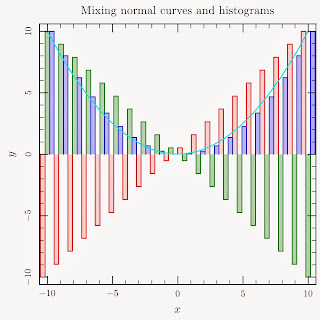 Work goes on on
ctioga2 away from rubyforge, to sourceforge. Transition went smooth, git is now the only VCS. Code is hosted at sourceforge and mirrored at github.
ctioga2. I've recently implemented a decent support for histograms. It is already much more powerful than the one in the old ctioga, but it is far from being feature-full. Here's a preview.I'm slowly preparing a new release for ctioga2, that would incorporate quite some fixes since the last time, and quite a few nice features in addition to the histograms. Stay tuned !
Saturday, October 12, 2013
8 months with a macbook pro retina 15''
Back in February, I wanted a new laptop for my work, so I bought a fancy Dell Latitude E6540 laptop. Bad luck, it was giving my sore eyes and horrible headaches, to the point I couldn't work more than a dozen minutes with it. As in my work, we were not allowed to buy PC laptops with any other vendor, my boss convinced me to get a 15'' macbook pro retina (yes that's about as expensive a laptop as you can get). Although quite reluctant at first, I did need a new laptop, so I gave in. Of course, I had to install debian on it. I booted once or twice on macos to leave enough space for Debian and install rEFIt so that I could boot into it. I had to use version 3.9 of linux else it wouldn't boot.
After about 8 month, I must say I'm quite pleased with the beast. The retina display is very neat (a 2880x1800 resolution!), and it is pretty fast. There are two annoyances though:
- I never managed to get either the non-free NVIDIA drivers or the integrated intel graphics to work. The NVIDIA driver give blank screen on X startup, while it doesn't even start with the intel drivers (and I've tried all the tricks I could find around). The fine point is that I don't have any hardware 3D acceleration !
- The wireless network is pretty unstable.
Another point is the update of GRUB: Debian's post-install scripts don't play nice with the EFI setup, so here is what I have to do to update to a newer version of grub, (and it's also what I had to do initially to install GRUB):
# mount /dev/sda1 /mnt
# grub-install --efi-directory=/mnt
The /dev/sda1 partition is the so-called EFI partition. I think it is created by rEFIt and it is essentially empty.
Monday, October 7, 2013
Release 0.7 of ctioga2
Quite a bit of work has gone into 
ctioga2 since my last post. Among the most interesting features, ctioga2 now features:
- full windows support, including proper file types associations
- fill syntax as powerful as
gnuplot's - an
impulsesplot style - unclipped plot elements along with full control of the curves depth: in front of axes, behind background lines...
- control of symbol size through a Z axis
The latter feature proved actually instrumental in a research project under way in my lab (which is why I wrote it in the first place). It is demonstrated in the image above, made using this code.
I've also started the gnuplot versus ctioga2 gallery I was speaking about in my last post, where I try to reproduce most of gnuplot's examples using ctioga2; it can be found here. While I don't like so much the look of the gnuplot graphs, and I try to keep the look of ctioga2's as close as possible to that look, it proved invaluable in detecting small bugs, fixing small glitches and providing inspiration for new features.
In the meantime, my todo-list for ctioga2 doesn't seem to get any smaller. Let's hope I'll implement them fast enough ! Keep posted...
Wednesday, September 4, 2013
Removing the background of an image
While in the process of polishing up a paper, I had to draw figures using a well-known proprietary program for drawing chemical formula whose name I will not write down, out of decency (but you know which one it is anyway). I'm using the mac version (yes, no version for Linux) which has a neat glitch in that the "Save As" button does not work at all: no way to export your chemical formula as a SVG/PDF/PNG picture or whatever ! So I resorted to the neat Print as PDF feature of macintosh. I had to edit the resulting PDF files by hand as some of the colors were wrong (great !), and when I tried to include the PDF, I realized they had a white background... No way !
So I dug in ImageMagick's convert documentation, and came up with the following code that converts the PDF file into a PNG with a transparent background:
convert -density 600 figure.pdf -channel alpha \
  -fx '((r == 1 && g == 1 && b == 1) ? 0 : 1)' figure.png
There are still some few points that look white but are probably not that white (due to antialiased rendering of the PDF file ?). There are many more things that can be done using the -fx operator, this page was helpful to me !
Edit: while the alpha channel seems to be on by default for PDF files, it is not necessarily the case for all images. If the above doesn't work, try adding -alpha Set before the -fx bit.
Subscribe to:
Posts (Atom)